
Enable MFA on your Azure Tenant Before 15th Oct 2024
Starting from the 15th of October 2024, Microsoft will be enforcing multifactor authentication (MFA) to sign into the Azure portal, Microsoft Entra admin center, and Intune admin center.
To ensure you/your users maintain access, you’ll need to enable MFA by the 15th of October 2024.
Microsoft is making these preconfigured security settings available to everyone, because we all know managing security can be difficult. Based on our learnings more than 99.9% of those common identity-related attacks are stopped by using multifactor authentication and blocking legacy authentication.
Microsoft’s goal is to ensure that all organizations have at least a basic level of security enabled at no extra cost.
Enforcement Phases
-
Phase 1: Starting in the second half of 2024, MFA will be required to sign in to the Azure portal, Microsoft Entra admin center, and Microsoft Intune admin center. The enforcement will gradually roll out to all tenants worldwide. This phase won’t impact other Azure clients such as Azure CLI, Azure PowerShell, Azure mobile app, or IaC tools.
-
Phase 2: Beginning in early 2025, MFA enforcement gradually begins for sign in to Azure CLI, Azure PowerShell, Azure mobile app, and IaC tools. Some customers may use a user account in Microsoft Entra ID as a service account. It’s recommended to migrate these user-based service accounts to secure cloud based service accounts with workload identities.
Enable Basic Entra ID MFA, No Entra ID Premium License Required
You can enable Basic Entra ID MFA without the need for a Premium Entra License.
Open the Azure Portal:
- Go to the “Microsoft Entra ID” module
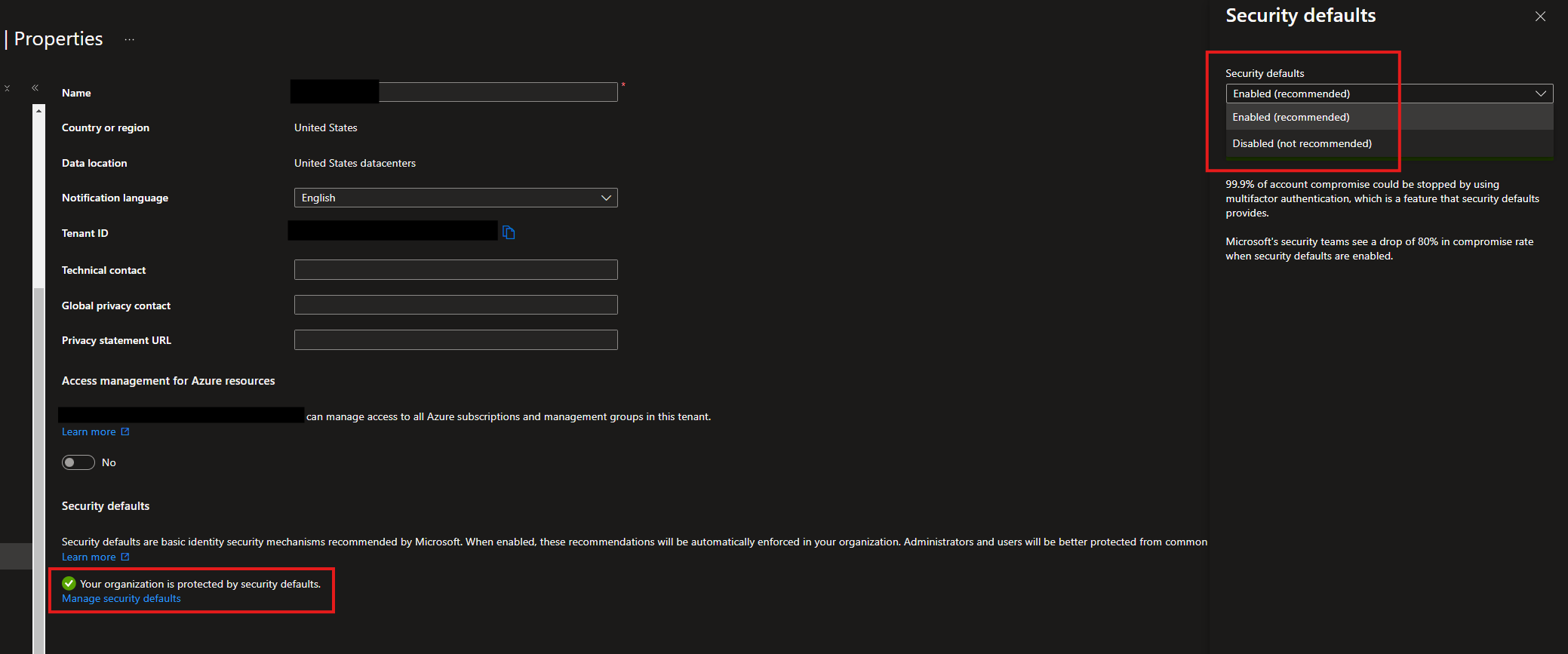
- Under “Manage” section, go to “Properties”
- On the “Properties” blade, scroll down and under “Security Defaults” you will see a link for “Manage security defaults”
- Click “Manage security defaults”, it opens a blade on the right with a drop down, with enable and disable options
- Select “enable” and save, at the bottom
Basic MFA is now enabled, no license required.
Bear in mind that this is the Basic MFA option so is not as configurable, in terms of exclusions, conditional access etc. For further functionality, you will need a Premium license.
Further guidance for enabling MFA with more features can be found here.